 Replayink
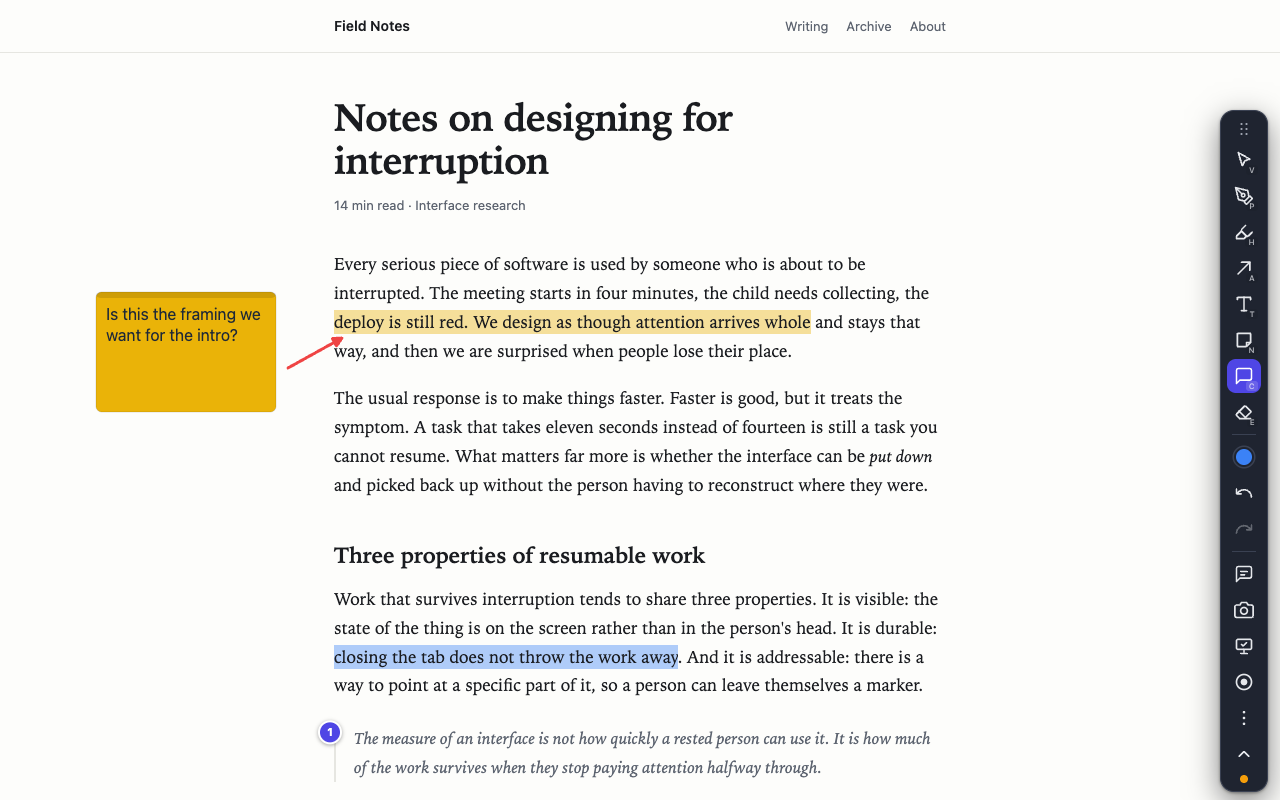
Highlight a sentence, step by step#
- Add Replayink to Chrome. It also runs in Microsoft Edge.
- Open the page you are reading and press the backtick key (the one to the left of
1). A small toolbar appears.Alt+Shift+Adoes the same from anywhere in the browser. - Press
Hfor the highlighter. - Drag across the words you want to keep. Let go, and they are highlighted.
- Keep reading. Press the backtick key again to put the toolbar away; your highlights stay on the page.
Change the highlight colour#
The keys 1 to 8 pick one of eight colours, and X steps to the next one. Any other colour is in the colour button on the toolbar.
A colour can carry a meaning. Out of the box red is Important, orange is To do, yellow is Key point, green is Done and blue is Question. Rename them or add your own in Settings, and everything you highlight is filed under the category of its colour.
Why the highlight is still there tomorrow#
A highlight is attached to the words it covers, not to a position on the screen. Reload the page, resize the window or let the layout rearrange itself, and the highlight stays on its sentence.
Highlights are saved in your browser against the page's address. If you are signed in to Chrome, they also appear on the same page on your other computers, through Chrome's own sync.
One limit: if a site rewrites the text between visits, such as a news article that was edited, the highlight has nothing to hold on to and is dropped rather than put in the wrong place.
See every highlight on the page in one list#
Press M for the notes panel. It lists every highlight, note and comment on the page, with a count per colour category and a search box. Click a row to jump to it. From the same panel you can copy all of it as Markdown and paste it into your notes.
Remove a highlight#
Press E for the eraser and click the highlight, or click it with the select tool (V) and press Delete. Ctrl+Z (⌘Z on a Mac) undoes the last change.
Share what you highlighted#
- A link. Copy share link packs your highlights into the link itself. Whoever opens it with Replayink installed is asked first, then sees the same highlights on the same page. Nothing is uploaded.
- A screenshot.
Alt+Shift+Ccopies a picture of the page with your highlights on it. - Your team. Share the page and everyone sees each other's highlights and can comment on them. See how to comment on a web page with your team.
It works on PDFs too#
A PDF link opens in Replayink's own viewer with the same highlighter. See how to annotate a PDF in Chrome.
Add Replayink to Chrome and highlight the page you are reading now. Free, for Chrome and Edge.